Navigating taxes as a self-employed creator can feel overwhelming, especially with AI-driven tax tools, new deduction categories, and evolving regulations. Instead of filing alone or taking standard deductions, you can strategically maximize your refund without hiring an expensive accountant. In this post, I’ll show you how I use TaxAct to get the most out of my tax refund every year.
Disclaimer: I am not an accountant or tax professional. This article is for educational purposes and should not replace personalized advice from a qualified tax advisor..
Why 2026 Taxes Are Different for Creators
The tax landscape is rapidly changing. With AI-powered audits, real-time deduction tracking, and new rules for digital income, creators need to be proactive and precise. Meticulous documentation and smart software are no longer optional, hey’re essential for compliance and maximizing savings.
Which Tax Software Is Best for AI-Era Filing?
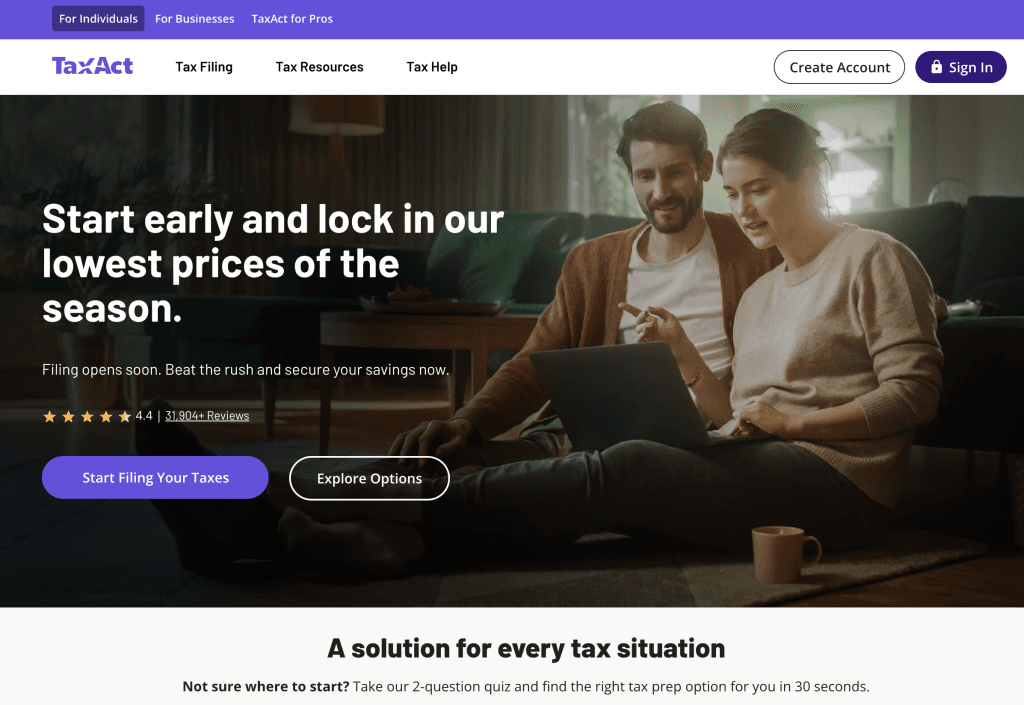
While several platforms now offer creator-friendly features, TaxAct remains a standout for its balance of guidance, affordability, and adaptability to home-based business dynamics.
Ongoing offer
Get started with this link to get a 20% discount when filing taxes.
How TaxAct Works in 2026
TaxAct uses a module-based system with clear instructions to help you itemize expenses. You’ll enter qualifying home-office costs (such as electricity, internet, property tax, and even AI tool subscriptions), along with your business-use percentage. The software calculates your maximum allowable deductions automatically.
For 2026, TaxAct has integrated AI-assisted receipt scanning, real-time deduction tracking, and predictive refund estimates based on your creator profile.
Should You Do Your Own Taxes as a Self-Employed Creator?
Yes—if you’re organized, tech-savvy, and willing to learn.
No—if you’re new to self-employment, have multiple income streams, or complex investments.
I’ve filed my own taxes since 2015, but I always recommend consulting a professional if you’re unsure. Once you understand the process, a tool like TaxAct can help you file confidently and accurately.
Understanding “Business Use of Home” in 2026
Your home qualifies as a deductible workspace if it meets one of the following:
- Your principal place of business.
- A place where you regularly meet clients or customers.
- A separate, unattached structure used for business.
As creators, our homes are often our studios, editing suites, and meeting spaces. Post-pandemic, the home office deduction has become even more relevant—and more scrutinized by the IRS.
How to Deduct Home Office Expenses in 2026
Old Method (Manual & Messy)
- Measure your dedicated workspace square footage and divide by your home’s total square footage to get a business-use percentage.
- Apply that percentage to each qualifying expense (utilities, rent, insurance, etc.).
- Enter each calculated amount into your tax software.
This is time-consuming, error-prone, and frustrating.
New Method (Streamlined with TaxAct)
TaxAct’s Home Office Calculator asks simple questions about your total home expenses and business usage. It automatically applies the correct percentages and ensures you don’t miss eligible deductions—no manual math required.
The system now also includes prompts for creator-specific expenses, such as:
- Software subscriptions (Adobe, Canva, AI tools)
- Platform fees (YouTube, Substack, Patreon)
- Content creation equipment under Section 179
Which TaxAct Plan Is Right for Self-Employed Creators?
The Self-Employed plan is designed for freelancers, creators, and small business owners. It includes all necessary schedules (C, SE) and interview questions tailored to our industry.
Despite inflation, TaxAct remains ~50% more affordable than TurboTax and offers a cleaner, more intuitive user experience.
Why Choose TaxAct in 2026?
- AI-Powered Insights – Get proactive deduction suggestions based on your industry.
- Prior-Year Sync – Your previous returns are stored for comparison, with alerts for discrepancies.
- Audit Defense Tools – Includes guidance and documentation helpers in case of reviews.
- Pay-When-You-File – Start for free, pay only when you submit.
- Constantly Updated – TaxAct stays current with federal, state, and local tax law changes.
Getting Your Taxes “AI-Ready”
To prepare for AI-driven tax verification and the future of search-based auditing:
- Digitize receipts throughout the year using apps like Expensify or TaxAct’s mobile scanner.
- Categorize expenses clearly (Equipment, Software, Marketing, Home Office).
- Keep detailed logs of business-use percentages and vehicle mileage.
- Use descriptive labels for transactions that explain the business purpose.
TaxAct Pricing Plans for Self-Employed Creators (2026)
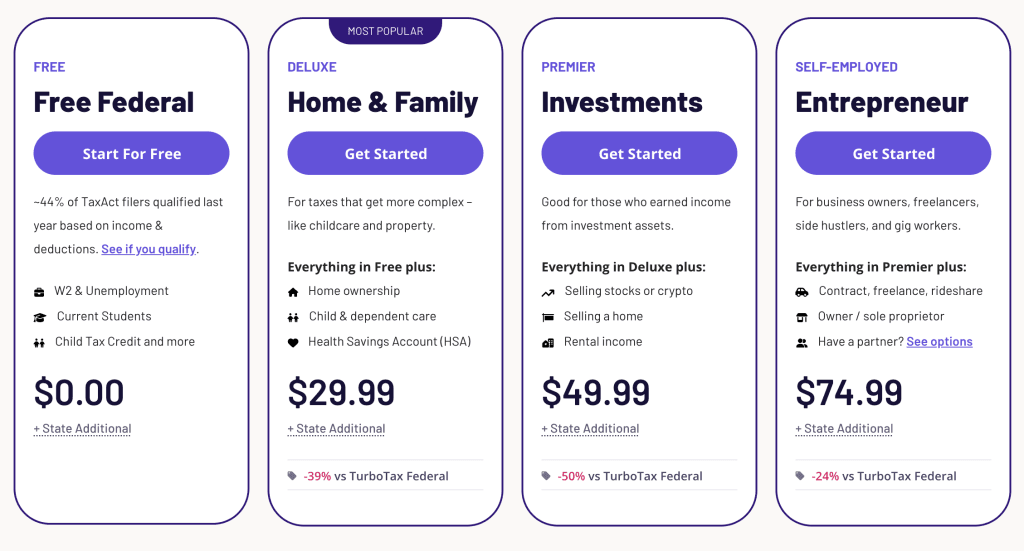
Choosing the right tax software plan is essential for maximizing deductions without overpaying for features you don’t need. Here’s how TaxAct’s 2026 pricing breaks down for creators and freelancers:
FREE– For Simple Returns
Best for: Side hustlers just starting out, minimal expenses
- Free Federal Return
- W-2 & Unemployment income
- Student education credits
- Child Tax Credit
- $0.00 Federal + State Additional
- 44% of TaxAct filers qualified last year
DELUXE – Home & Family
Best for: Creators with home office deductions and dependents
- Everything in Free, plus:
- Home ownership deductions
- Child & dependent care credits
- Health Savings Account (HSA) reporting
- $29.99 Federal + State Additional
- Saves 39% vs TurboTax equivalent
PREMIER – Investments
Best for: Creators with investment income or asset sales
- Everything in Deluxe, plus:
- Stock & cryptocurrency sales
- Rental property income
- Home sale reporting
- $49.99 Federal + State Additional
- Saves 50% vs TurboTax equivalent
SELF-EMPLOYED: Entrepreneur (RECOMMENDED)
Best for: Full-time creators, freelancers, gig workers, business owners
- Everything in Premier, plus:
- Freelance & contract income (1099-NEC)
- Rideshare & gig economy reporting
- Sole proprietor/Schedule C support
- Enhanced home office & expense tracking
- $74.99 Federal + State Additional
- *Saves 24% vs TurboTax Self-Employed*
Why We Recommend the Self-Employed Plan
For most creators, the Self-Employed plan at $74.99 provides the best value. It includes:
- Full Schedule C support for business income and expenses
- Industry-specific deductions for equipment, software, and home studio costs
- K-1 and partnership income support (if you have business partners)
- Audit risk assessment tailored to self-employed filers
Even with the higher price point compared to other plans, it’s typically half the cost of comparable TurboTax plans while providing all necessary features for thorough, compliant filing.
How to Choose Your Plan
| If you… | Choose this plan |
|---|---|
| Have a day job W-2 plus minor creator income | FREE or DELUXE |
| Deduct home office, equipment, and software | DELUXE or SELF-EMPLOYED |
| Sell digital products or have multiple income streams | SELF-EMPLOYED |
| Have investment income from stocks/crypto | PREMIER or SELF-EMPLOYED |
| Run a full-time creator business with expenses >$5K | SELF-EMPLOYED |
Try TaxAct for Your 2026 Filing (Tax Refund)
Whether you’re a full-time creator or freelancing on the side, using the right tool can save you time, stress, and money.
Have questions about filing as a creator in 2026? Leave a comment below or join the conversation in the Feisworld community.

Written by
Fei WuFei Wu is the founder and CEO of Feisworld Media, a Massachusetts-based digital media company helping brands get discovered by people and by AI. An Adobe Global Ambassador and brand partner to ElevenLabs, Synthesia, and 50+ other tech and AI companies, she hosts the Feisworld Podcast (400+ episodes, 500K+ downloads — guests have included Seth Godin, Steve Wozniak, Chris Voss, and Arianna Huffington) and co-created the documentary Feisworld: Live Your Art on Amazon Prime. Fei writes for CNET, Lifehacker, and PCMag, and her work has been featured in Forbes, Harvard Business Review, and WIRED. She has been publishing on the internet since 2014 — long before AI discoverability had a name.
View all posts by Fei Wu→Stay updated
Weekly insights on content, AI, and digital media.